
Cisco ASA
NOTE: Be sure to make a backup of your current ASA configuration before performing any changes.
Configure logging using the ASDM GUI#
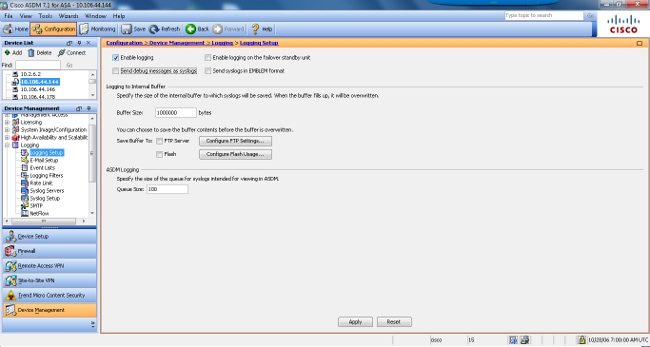
- Ensure logging is enabled. Visit Configuration > Features > Properties > Logging > Logging Setup. Check the Enable logging check box in order to enable syslog output.
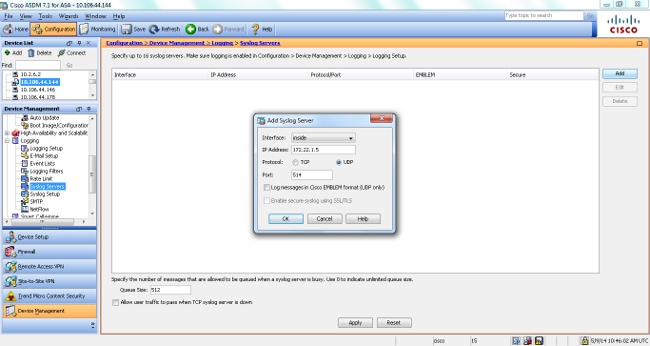
- Configure the external Syslog Server: Choose Syslog Servers under Logging and click Add in order to add a syslog server. Enter the IP of your Remote Ingestion Node (RIN), choose UDP, and enter 1514 (or another port if instructed by SolCyber) in the Add Syslog Server box and choose OK when you are done. Be sure to leave “Log messages in Cisco EMBLEM format” unchecked.
- Enable Log Sending: choose Logging Filters in the logging section. This presents you with each possible logging destination and the current level of logs that are sent to those destinations. Choose Syslog Servers and click Edit.
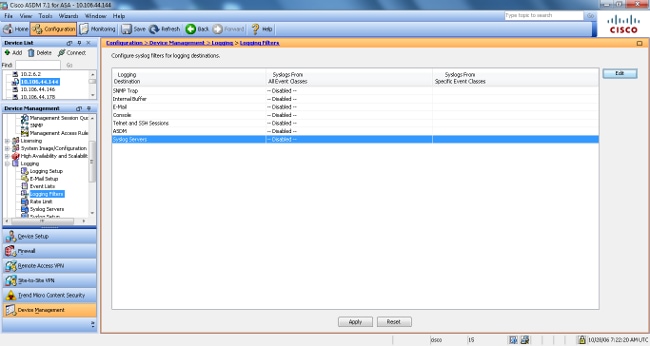
- Select Filter on Severity and Informational. Click OK.
- Click Apply - this will apply the new settings. If you experience any issues with connectivity after applying the new config, revert to your backup config.
Configure Logging Using the CLI#
text
logging enable
logging host <interface_name> <sensor_ip> udp
logging permit-hostdown
logging timestamp
logging device-id hostname
no logging emblem
The <interface_name> argument specifies the interface through which you access your Remote Ingestion Node (RIN). The sensor_ip argument specifies the IP address of the RIN.
Verify Logs#
Use the following command to verify if the RIN is receiving logs
text
tcpdump -i any udp port 1514 -v -A