
Onboarding Guide

Intro#
This document serves as a high-level guide to help customers understand the SolCyber onboarding process.
Objectives#
- Transition security operations to SolCyber.
- Get to know your team.
- Establish roles and responsibilities.
- Understand the process and timelines.
Key Stakeholders#
| Role | Customer/SolCyber | Main Responsibility |
|---|---|---|
| Customer Success | SolCyber | Ensure success of onboarding and point of contact for all non-security related queries |
| Lead Analyst | SolCyber | Primary security contact |
| Project Lead | Customer | Lead contact for on-boarding to help coordinate between the different parties |
| Security Lead | Customer | Lead contact to work with the SolCyber SOC |
| Email Admin | Customer | Assist with deployment of Advanced Email Protection |
| IT Desktop Admin | Customer | Assist with deployment of Endpoint Persistence Agent |
| Network Admin | Customer | Assist with deployment of Lateral Movement Detection node |
Key Milestones and Timeline#
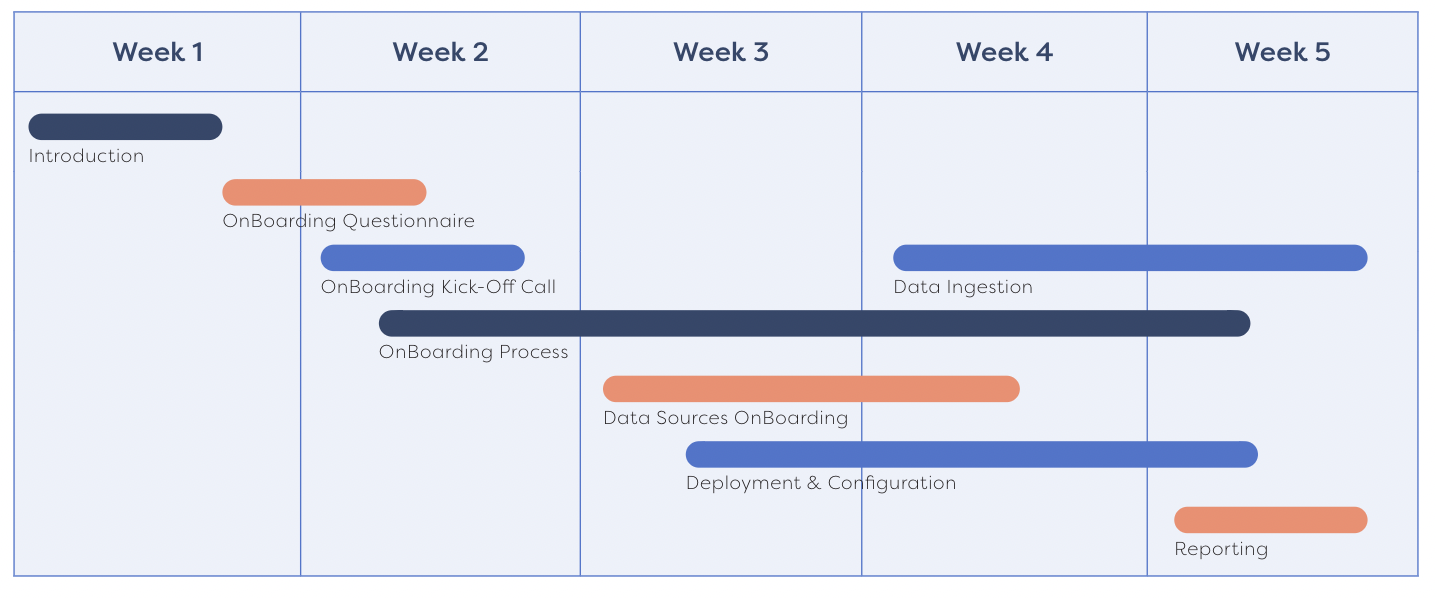
Onboarding Summary#
Week 1: Introduction Call#
- Get to know your SolCyber team
- Discuss onboarding process and adjust the timeline as needed
- Discuss SolCyber questionnaire
Key Action: Complete questionnaire
Week 2: Onboarding Kickoff Call#
- Review the results of the questionnaire
- Introduce us to your infrastructure, security, devices, etc.
- Briefing on SolCyber foundational service
Key Action: Fix schedule for deployment and integration
Weeks 3-4: Configuration, Deployment, and Data Sources Onboarding#
- Begin Onboarding Process
- Identity logs
- Email protection
- Endpoint protection
- Phishing simulation
- Device logs
- Schedule phishing simulation
Note: Multiple meetings and workshops may be required within this time range
Key Action: Work with your SolCyber team to onboard foundational services
Week 5: Reporting#
- First phishing simulation emails are sent out
- Verify your environment and inventory
- Ensure that all service components have been enabled
- Schedule a security review
- Receive your first monthly report
Key Action: Nothing – your onboarding process is complete!
Key Documents#
Email Security Setup Guides#
O365 Email Security Deployment and Configuration Guide
Google Workspace Email Security Deployment and Configuration Guide
Endpoint Setup Guides#
Phishing Simulation IP Whitelisting Guides#
Phishing Simulation Whitelisting - Office 365
Phishing Simulation Whitelisting - Google Workspace