Text Add-Ons for Spoofs
Sometimes, emails identified as suspicious can be legitimate. This is a common case for emails that are flagged as a SPOOF. SolCyber does not quarantine emails labeled as “SPOOF”, however, we do recommend that customers add an extra layer of protection by enabling an optional add-on.
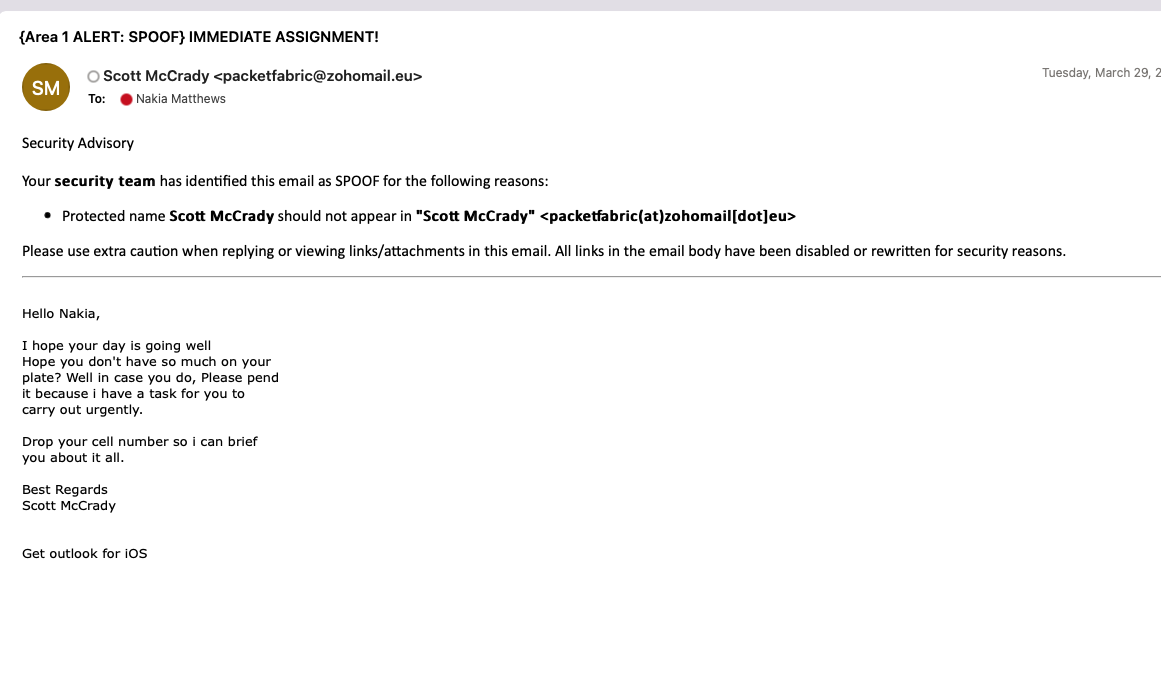
These text add-ons display in the subject and/or body of an email when a user receives an email that has been determined to be a “classic” SPOOF by Area1.
Classic spoofs are emails where the displayed sender address and true sender address/server in the message headers do not match.
For example, if an email is sent from Jira letting you know that someone has added a comment to a ticket, you might get an email that looks like this:
From: employee@yourcompany.com
To: you@yourcompany.com
Subject: Employee Added a Comment to Ticket #1234
However, if you were to look at the headers of the message, you will see that the original server that sent the message is a Jira/Atlassian mail server, NOT your company’s mail server.
In this scenario, if you have the text add-on enabled, the subject would look something like this: “{SPOOF} Employee Added a Comment to Ticket #1234”.
The aforementioned scenario is an example of a legitimate spoof. Below you will find an example of what text add ons look like in the subject and body of truly malicious spoof. We strongly recommend enabling the Text Add-on for at least the Subject. Please note that the exact text shown in the braces is customizable.